Archive Page 2
How To: Centering HTML exports in Fireworks
5 Comments Published by boris March 23rd, 2012 in technology, web developmentIf you export from Fireworks into clickable HTML prototypes, you’ll find that your exports are always left-aligned – even if you select center alignment during the export. This seems like a bug to me, luckily there is a fairly painless workaround.
Note: Tested in Fireworks CS5 on Mac, but should work approximately the same in other versions or Windows.
Open /Applications/Adobe Fireworks CS5/Configuration/HTML Code/Dreamweaver/SLICES.XTT and locate the following line: (line 662)
WRITE_HTML("<!--Fireworks CS5 Dreamweaver CS5 target. Created ", d, "-->\n"); |
Now add the following right below it:
WRITE_HTML("<style>body {text-align:center;}</style>\n"); |
and BAM! You’ve got centered exports.
 If you haven’t heard of Animata, take a look at it now. Its amazing animation software that you can control with your body. Back in 2009 we threw a party where guests could control a projected, animated musician by moving their arms and body. I corresponded with Bence, the Animata developer to get this working on Windows, and had meant to do a full write up. Here we are nearly two years later. I’ll do my best to reconstruct the steps as the effect is still very cool.
- Download Animata
- Download Eyesweb 4.0.0.10
- Download Bence’s script
- Hook up your camera
- Follow Bence’s advice: eyesweb sends the positions of the skeleton in variable sizes, eg. if you get closer to the camera the skeleton will grow, and that’s what animata cannot handle. The program I wrote maintains the size of your skeleton. Now it is working quite well: http://www.binaura.net/bnc/temp/ShadowTheatreEngine.zip. After you have to opened all 3 applications, create 12 Joints in Animata named body0joint0, body0joint1 … body0joint11 (this is very important!) after this, you will see that everything is moving, which is very good, so you are almost there….This program receives the data from eyesweb and forwards the right data to animata. Also you have to adjust your skeleton size, the length of the arms etc. to fit your character in animata, that is what you can do in EDIT mode.
- At this point you should be able to achieve something like my screencast below:
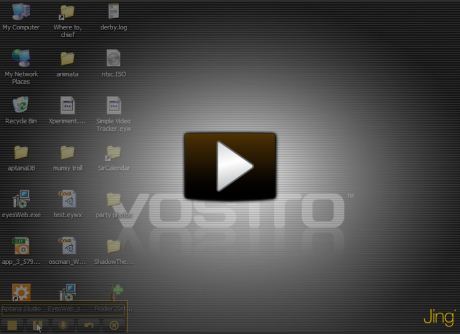
- The problem I describe in the screencast was resolved with the following reply from Bence: Your problem is in eyesweb is the camera resolution, you can change if you click on the camera icon, and you can change it in the parameter window. Try to set it 320×240 if you are using webcam the engine communicates width animata through OSC messages: you should set the OSC object in eyesweb like this: host_name : 127.0.0.1, port: 12000, OSC_command: /body eyesweb to shadow-engine communicates on port 12000, engine to animata on port: 7110…
How To: Recover from Failed Amazon EC2 Instances (and fail they will)
8 Comments Published by boris February 7th, 2011 in aws, technologyOne of the things that’s not immediately obvious about Amazon EC2 instances is that they could fail, in fact Amazon says:
It’s inevitable that EC2 instances will fail, and you need to plan for it. An instance failure isn’t a problem if your application is designed to handle it.
The EC2 forum posts are littered with users whose EC2 instances have become unresponsive and can not be stopped or restarted. Instances can get “stuck” in “stopping” mode for 24 hours or more. Amazon generally recommends issuing a forced stop via the client tools “ec2-stop-instances –force” command, but this actually doesn’t seem to work in most cases.
Luckily, Eric Hammond wrote a post about how to move EC2 instances to new hardware if such a problem were to occur (as it did to me). Eric’s solution relies on the client tools under Linux.
It turns out that its possible to replicate these steps directly in the Amazon panel and quickly recover from a failed instance. I recommend everyone follow these steps to prepare for a failure scenario:
- In the “Instances” panel: create a new instance using the same AMI as your production instance. This is your backup instance. “Stop” the instance after it is created. (Amazon will not charge you for any stopped instances).
- In “Volumes”: detatch and then delete the drive that was created as part of this new instance.
- Still in Volumes: create a spapshot of your production drive.
- Go to the “Snapshots” section of the panel, select your new snapshot and choose “create volume from snapshot.” Be sure to choose the same availability zone as your instance. I’ve seen some caching issues here, so if you don’t see your snapshot when selecting this menu, be sure to refresh.
- Go back to “Volumes” and choose “attach volume” on your new available volume. Choose your stopped backup instance and type in the same device as your original volume (visible under “attachment information” for the volume)
- Go ahead and start your backup instance, it should be an exact copy of your production instance.
- Sleep better at night.
Tagging for Git Deployment
0 Comments Published by boris February 5th, 2011 in technology, web developmentGit pulls are a fairly easy way to deploy your code, and we’re doing just that at my new event promotion startup. We wanted to take our release process just one small step further by tagging our releases so that we know exactly what is running in production and when it got there. Instead of using formal release numbers we decided to just use a simple date system: YY.MM.DD.HH.mm (using leading 0s and the 24 hour clock). For example if I were to do a release right now I would tag it 11.02.04.17.44
If you are developing on windows, the following .bat file will take care of creating such a tag for you and pushing it to your remote repository (i.e. Github):
call git tag %date:~12,2%.%date:~4,2%.%date:~7,2%.%time:~0,2%.%time:~3,2% call git push --tags cmd |
The next step in the deployment is to pull down the tag in QA:
git fetch git checkout YY.MM.DD.HH.mm (referring to your previously named tag) |
This process can be repeated in production, but if it fails QA testing we delete the tag with the following commands and start over.
git tag -d YY.MM.DD.HH.mm (to delete your local tag) git push origin :YY.MM.DD.HH.mm (to delete the remote tag) on QA: git tag -d YY.MM.DD.HH.mm (to delete the QA local tag) |
If you’re not immediately creating a fixed release, update QA to the prior tag using
git checkout YY.MM.DD.HH.mm |
As an alternative workflow, you could create your tags in QA after QA testing has passed, in which case you could create this bash file
tag=`date +"%y.%m.%d.%H.%M"` git tag $tag git checkout $tag git push --tags |
16 Countries and 40,000 Miles Later
0 Comments Published by boris December 5th, 2010 in culture, site newsI have returned after 11 1/2 months abroad. My travels (mostly sans words) are documented at http://go.borism.net. The journey took me to 16 countries and over 40,000 miles (see travel map).
We recently released a feature that allows our users receive a text message if a bus they are awaiting is running late. It’s all pretty simple, we take the output of this form and run a little excel macro to convert the entered data into email addresses. We then email the affected parties and they get the the alert via SMS. There’s a couple hard-coded values in this macro for simplicity, modify it to suit your needs:
'Transform cell phone numbers to email addresses for sending text messages 'Boris Masis 08/19/2009 Option Explicit Sub ProcessTextMessaging() Dim emailDomain Range("L1").Value = "Email" Range("C2").Select 'Loop though until we run out of rows Do Until ActiveCell.Value = "" Select Case ActiveCell.Value Case "Alltel" emailDomain = "@message.alltel.com" Case "AT&T" emailDomain = "@txt.att.net" Case "Boost" emailDomain = "@myboostmobile.com" Case "Cricket" emailDomain = "@sms.mycricket.com" Case "MetroPCS" emailDomain = "@mymetropcs.com" Case "Sprint" emailDomain = "@messaging.sprintpcs.com" Case "Nextel (Sprint)" emailDomain = "@page.nextel.com" Case "T-Mobile" emailDomain = "@tmomail.net" Case "Tracfone" emailDomain = "@mmst5.tracfone.com" Case "US Cellular" emailDomain = "@email.uscc.net" Case "Verizon" emailDomain = "@vtext.com" Case "Virgin" emailDomain = "@vmobl.com" End Select 'write the email to a new cell ActiveCell.Offset(0, 9).Value = ActiveCell.Offset(0, -1) & emailDomain & "," 'select the next cell down ActiveCell.Offset(1, 0).Select Loop End Sub |
The providers above have over 1 million U.S. subscribers, and almost all providers have email to SMS gateways.
You can download my xls file that includes this macro, or the .xla file which is an Excel add-in that will add a “Process Text Messaging” section to your Tools Menu. I followed the template at http://www.cpearson.com/excel/CreateAddIn.aspx to create this add-in.
Write Yourself a Merry Little URL Re-writer
3 Comments Published by boris August 21st, 2009 in technology, umbraco, web developmentA common web development concern is the www subdomain. Do you host at http://www.site.com or http://site.com? Which ever you choose you want to be sure that visitors who type in the other get re-directed properly.
If you use IIS you can setup a new website to do such a permanent redirect, but that solution doesn’t scale well. For example, we run 42 websites using one install of umbraco, and consequently one IIS website. We’d need 42 new websites in IIS to use the built-in redirect feature.
One example site is http://en.culturalcare.com, and I want to make sure that if someone types in http://www.en.culturalcare.com they get redirected properly. The solution is to write a little generic URL re-writer yourself using the global.asax file.
< %@ Application Language="C#" %> <script runat="server"> protected void Application_BeginRequest(Object sender, EventArgs e) { string domainName = Request.Url.Host.Replace("www.", "").ToLower(); string sOldPath = HttpContext.Current.Request.Path.ToLower(); string sPage = "http://" + domainName + sOldPath; Response.Clear(); Response.Status = "301 Moved Permanently"; Response.AddHeader("Location",sPage); Response.End(); } </script> |
As you can see the code removes “www.” from the url and 301 redirects to the non-www version. It also passes the full path.
You could modify the code slightly to add www’s instead of removing them if that’s the desired effect:
< %@ Application Language="C#" %> <script runat="server"> protected void Application_BeginRequest(Object sender, EventArgs e) { string domainName = Request.Url.Host.ToLower(); string sOldPath = HttpContext.Current.Request.Path.ToLower(); string sPage = "http://www." + domainName + sOldPath; Response.Clear(); Response.Status = "301 Moved Permanently"; Response.AddHeader("Location",sPage); Response.End(); } </script> |
Download a full example for use with IIS.
To implement:
- create a new site in IIS and add host headers for all of the domains you would like to redirect
- extract the zip above to the directory setup in IIS
- setup wildcard application mapping in IIS to let the global.asax file handle all requests (not just ones that end in .aspx, etc). On windows server 2003 just go to Home Directory -> Configuration and paste in the aspnet_isapi.dll location in the wildcard application maps section. By default the path is C:\WINDOWS\Microsoft.NET\Framework\v2.0.50727\aspnet_isapi.dll (uncheck “Verify that file exists”)
Add Smart Routing to Wufoo with Gmail
3 Comments Published by boris August 6th, 2009 in technology, wufooWe sure love our wufoo around here, and one thing we’ve been using more and more is smart routing for our entries. For example, when someone fills out a lead form we want to route the entry to the appropriate sales person based on the state of the inquiry.
Wufoo doesn’t natively provide “smart” routing like this, but its simple enough to add through some google filters magic. Here’s how we do it:
- Setup a google apps or gmail account for the routing
- Create filters in this account for emails that arrive from no-reply@wufoo.com and contain certain words (for example, the state name). When a state matches, forward the entry to the appropriate sales person.
- Point your wufoo notifications to go your new gmail account
One gmail limitation is that only 20 filters can forward to other addresses per account. This is easy to workaround by creating multiple accounts (i.e. states1, states2) and listing all of them in your wufoo notification settings.
Web Apps in 150 lines or less
0 Comments Published by boris July 14th, 2009 in technology, web developmentWe recently completed work on AuPairVideos.com. The site went from concept to launch in just over a month, in part thanks to its lightweight single-page design. We ended up writing ~150 lines of code in each layer:
- 152 lines of HTML
- 165 lines of CSS
- 159 lines of JavaScript
- 147 lines of PHP
- 88 lines of SQL
If only everything could be so simple.

Tools such as Quick Ribbon are great for generating simple and effective ribbons such as this one:

A small problem though is the potential to block content underneath the ribbon transparency area. For example, that “About Us” link is obscured by the large square ribbon image.
A simple workaround is to split the ribbon image in two (or more) pieces as I’ve highlighted below and stitch them together in CSS. Now the “About Us” link can be clicked just fine.

#ribbon-top { position:absolute; top:0; left:20px; } #ribbon-bottom { position:absolute; top:75px; left:0; } |
Search
About
Hi, I'm Boris. This is my website.
Archives
Categories
- android (3)
- aws (1)
- ballroom (2)
- culture (5)
- facebook (1)
- google analytics (3)
- google app engine (1)
- metrics (1)
- mobile (1)
- music (1)
- productivity (1)
- site news (5)
- technology (30)
- tiddlywiki (1)
- umbraco (4)
- web development (13)
- wordpress (2)
- wufoo (3)